
CAUTION! Before proceeding, turn the machine off, but leave it plugged in.
This section describes the procedures involved in maintaining your AMAYA. This section is very important, because maintenance is essential to the performance of your machine.
It is very important that you clean your machine regularly. Dust and lint accumulation can damage both electrical and mechanical systems.
Clean outer surfaces once per month with a soft, clean cloth, a mild detergent and water. Wring out the cloth before wiping the surfaces. Do not get water or any other fluids inside the machine or on any of the working mechanical surfaces.
If an accidental spill occurs, turn the machine off then wipe up excess fluid with a clean dry cloth and allow the machine to dry completely before turning the power on.
The main PCB can be damaged by dust accumulation. It is important that you periodically remove this accumulation. To do so, complete the following steps:
|
|
CAUTION! Before proceeding, turn the machine off, but leave it plugged in. |
Remove the base cover. You will see the EMI shield covering the main PCB.
Remove the screw(s) that hold the EMI shield in place.
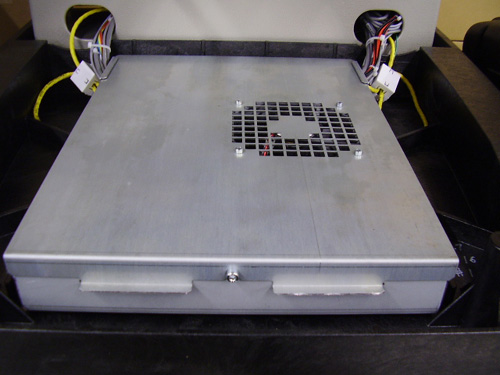
Carefully lift the EMI shield from the main PCB. If required, disconnect the fan connector from the main PCB.
|
|
CAUTION! Be careful not to drop metallic hardware or tools onto the Main PCB while it is exposed. Doing so can result in severe damage to the electronics that might be expensive to repair. |
Use any compressed air labeled as ESD safe (and labeled for use on electronic components) to blow any accumulated dust out of the base interior. When doing so, do not touch the main PCB.
Some compressed air brands have a liquid accelerant that is discharged from the container while blowing dust off the machine. Always allow any liquid discharge to completely evaporate before turning the machine back on.
Carefully place the EMI shield over the main PCB and re-install the screws.
Replace the base cover before turning the machine back on.
Lint and dust can build up in the trimmer assembly and the rotary hook. Clean this at least once per day.
1. Turn off the machine.
2. Remove the needle plate by removing the two screws on the underside of the extrusion.
3. Clean the exposed area with canned or compressed air.
|
|
Note: Excessive thread or lint buildup may require removal or disassembly of the trimmer. |
You should also frequently check this area for loose thread.
If you are frequently performing applications that require you to use adhesive spray, it is recommended that you clean the rotary hook area at least once a day with a lightweight lubricant spray (such as WD-40). To do this:
Turn off the machine.
Remove the needle plate by removing the two screws on the underside of the extrusion.
Clean the exposed area with canned or compressed air.
Spray the exposed area with a lubricant spray.
Turn the machine back on, then rotate the hook all the way around a couple of times.
Spray the exposed area with canned or compressed air again.
Re-install the needleplate.

